【Astra CPU Silencer Standard v2.9.6】
- ダウンロード商品¥ 500
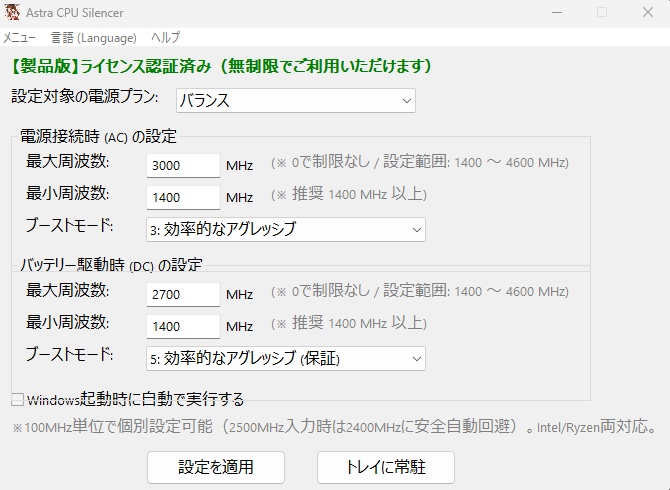
🎉 作者の誕生日記念!セール! 🎉 🌙 まさTech!! 週末ナイトタイムセール開催! 10月23日(金)~25日(日)の3夜限定! 毎晩20:00~翌朝5:59(日本時間) ⚡ Astra CPU Silencer Standard Edition:150円 ⚡ Astra CPU Silencer Extreme Edition:300円 Intel・AMD対応。CPU周波数の設定に加え、ターボブーストの動作モードも調整できます。 CPU電圧を直接変更せず、Windowsの電源管理機能を利用するCPU制御ユーティリティです。 この機会にぜひご覧ください!😊 ================================================== 【Astra CPU Silencer v2.9.6】 CPU電圧やBIOSを直接変更せず、 Windows標準の電源管理機能を利用して、 静音・省電力・発熱対策を手軽に行えるCPU電源管理ユーティリティです。 ================================================== 💡 Astra CPU Silencerとは? ================================================== Windows標準のCPU電源管理機能を利用して、 ・CPU最大周波数 ・最小性能状態 ・ブースト動作 ・Windows電源プラン を分かりやすいGUIから調整できます。 「ノートPCのファン音を抑えたい」 「発熱を減らしたい」 「バッテリー消費を抑えたい」 「普段使いではCPU性能を少し抑えて静かに使いたい」 そんな用途を想定した、安全性重視のStandardモデルです。 ================================================== ⚙️ CPUの周波数とターボブーストを、簡単に設定 ================================================== Astra CPU Silencer Standardは、Intel CPUとAMD Ryzen CPUのモデルを自動判定し、 CPU仕様データベースと照合しながらWindowsの電源管理設定を行うアプリです。 最大周波数の上限だけでなく、ターボブーストの動作方針も選べます。 ターボブーストを完全に無効にするほか、上限を指定してブースト領域を活用する使い方もできます。 例えば、最大ブースト周波数が4900MHzのCPUで3800MHzを上限に設定すれば、 対応環境ではその設定を踏まえてWindowsとCPUが負荷などに応じて周波数を自動調整します。 指定した周波数へ固定するものではなく、到達する周波数はCPUや動作条件で異なります。 Standardの周波数設定は100MHz刻みです。 電圧やCPU倍率を直接変更する必要はなく、設定後の周波数・ブースト動作はWindowsとCPUに任せます。 ================================================== ⚡ ターボブーストの7つのモード ================================================== Standardは、Windowsの「Processor Performance Boost Mode」0~6に対応しています。 0:無効 ブーストを無効にする方針です。 1:有効(標準) Windows標準のブースト動作を利用します(初期値)。 2:アグレッシブ 性能を高める要求をより積極的に行う方針です。 3:効率的な有効化 効率を考慮しながらブーストを利用する方針です。 4:効率的なアグレッシブ 効率も考慮しつつ、性能を積極的に要求する方針です。 5:アグレッシブ(保証) 保証性能レベルを基準に積極的なブースト要求を行う方針です。 6:効率的なアグレッシブ(保証) 保証性能レベルを基準に効率も考慮してブーストを要求する方針です。 ※ 選択したモードの実際の効果は、CPU・Windows・BIOSなどによって異なります。 ※ 「アグレッシブ」は常に最高周波数で動作するという意味ではありません。 ================================================== 🛡️ Standard版の安全設計 ================================================== Standard版では、 最小周波数入力に1400MHzの安全下限を設けています。 設定は100MHz単位です。 最大周波数の 0MHz は【制限なし】を意味します。 オーバークロックを行う設定ではありません。 最小周波数として入力したMHz値は、 Windowsの「最小のプロセッサの状態(%)」へ換算されます。 CPUを入力したMHzへ固定するものではありません。 ================================================== 🔍 CPU仕様データベース ================================================== CPU型番がCPU仕様DBと完全一致した場合のみ、 ・メーカー公称ベース周波数 ・メーカー公称最大周波数 を表示します。 DBで確認済みの最大値だけを入力上限として使用し、 未確認CPUの最大周波数を推測しません。 DB未確認CPUでは、 0MHz(制限なし)をご利用ください。 確認済み最大値を超える値が入力された場合は、 入力欄を最大値へ修正します。 ただし、そのクリックではWindows設定を書き換えません。 修正された値を確認してから、 もう一度[設定を適用]を押す二段階方式です。 ================================================== 🛡️ 2500MHz安全回避 ================================================== 本プロジェクトの実機検証に基づき、 2500MHz が入力された場合は、 2400MHz へ自動的に変更します。 ================================================== ⚡ 3つのプリセット ================================================== 🔴 通常モード 最大周波数制限を解除 🟡 中速サイレント AC:3.0GHz / DC:2.6GHz 🟢 低速超省エネ AC:1.8GHz / DC:1.6GHz タスクトレイから簡単に切り替えできます。 ================================================== 🔄 Windows電源プラン切り替え ================================================== Windowsに登録されている電源プランを Astra CPU Silencerの画面から選択し、 そのままアクティブプランへ即時切り替えできます。 AC(電源接続時) DC(バッテリー駆動時) それぞれの設定を管理できます。 ================================================== 🛡️ 復元機能 ================================================== 【変更前へ復元】 Astra CPU Silencer使用前に保存した CPU電源設定とProcessorメニュー表示状態へ戻します。 【完全初期化】 CPU設定をAstra基準初期値へ戻し、 ProcessorメニューをClean Baselineへ整理し、 アプリ設定を初期化します。 ================================================== 🎁 60分無料体験 ================================================== ライセンス未登録状態でも60分間お試しいただけます。 体験時間は累積方式です。 手動でテストを終了した場合は、 残り時間を次回起動時へ引き継ぎます。 体験終了時は、 保存済みの変更前CPU設定への復元を試みた後、 ライセンス登録画面を表示します。 ================================================== 🔑 製品版ライセンス ================================================== BOOTHでご購入後、 [メニュー] →[ライセンスキーの登録] からマシンIDをご確認ください。 発行されたライセンスキーを入力すると、 製品版としてご利用いただけます。 ================================================== 📂 パッケージ内容 ================================================== ・Astra CPU Silencer Standard_2.9.6.exe ・licenses ・MANIFEST-SHA256.txt ・README_EN.txt ・README_JP.txt ・THIRD_PARTY_NOTICES.txt ・THIRD-PARTY-RIGHTS.txt ※ 配布ZIPにはREADME、第三者ソフトウェアの告知・権利資料、licenses/、source/等も含まれます。 EXEのみを抜き出さず、ZIP全体を展開して同梱資料をご確認ください。 ================================================== 📄 診断ログ ================================================== 保存先:C:\Users<Windowsユーザー名>\AppData\Roaming\Astra_CPU_Silencer\Astra_Diagnostic_Log.txt サポートや不具合調査に必要な診断情報は、 上記AppDataフォルダへ保存されます。 ================================================== 💻 動作環境 ================================================== 正式対応OS: Windows 11 64-bit 対応CPU: Intel CPU AMD Ryzen CPU 管理者権限が必要です。 ※Windows 10でも動作する場合がありますが、 正式サポート対象外です。 ================================================== 【免責事項・ご注意点】 ================================================== ・本ソフトウェアはWindows標準APIのみを使用する安全設計ですが、 CPUの動作周波数を変更する特性上、お使いのPC環境や設定値によっては OSの動作低下や一時的なフリーズが発生する可能性がございます。 ・本ソフトウェアの使用、または使用不能によって生じた 直接的・間接的な損害 (ハードウェアの故障、データの消失、事業の中断、機会損失等) について、開発者(Masa Tech!! / イタチ)は 一切の責任を負いかねます。 ・必ずお使いの環境にて 「無料お試し版(Trial)」で動作確認を行った上で、 ご自身の責任においてご利用・ご購入ください。 ================================================== 💌 お問い合わせ・サポート ================================================== masatech.dev.apps@gmail.com 開発: イタチ(教官 / まさTech!!) 真昼(Mahiru)
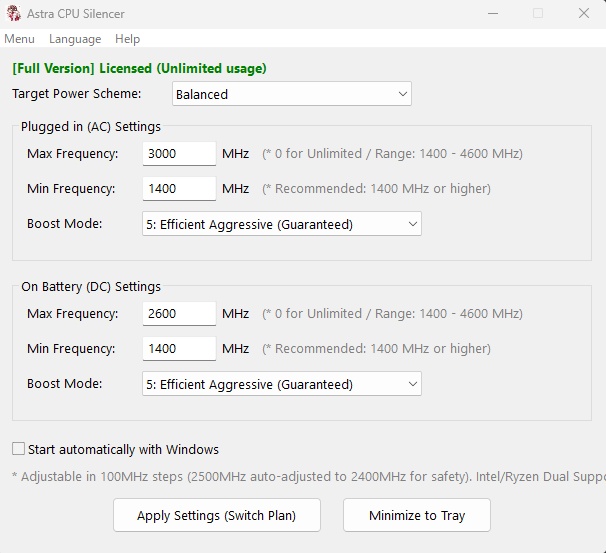
🌙 MasaTech Weekend Night Sale! ⚡ 3 Nights Only: October 23–25, 2026! Special sale hours each night: 8:00 PM – 5:59 AM (JST / UTC+9) The sale starts each evening in Japan and continues until the following morning. Special Sale Prices 🔹 Astra CPU Silencer Standard Edition: ¥150 🔹 Astra CPU Silencer Extreme Edition: ¥300 Both editions support Intel and AMD processors, allowing you to configure CPU frequency limits and Turbo Boost behavior. They use Windows' built-in CPU power-management functions without directly modifying CPU voltage. Standard Edition: Simple CPU frequency and boost management. Extreme Edition: Fine-grained 10 MHz frequency settings with a 15-second safety confirmation and automatic rollback. 🎁 Both editions offer a 60-minute free trial so you can check compatibility before purchasing. 📅 Sale Schedule (Japan Standard Time) - Friday, October 23, 8:00 PM – Saturday, October 24, 5:59 AM - Saturday, October 24, 8:00 PM – Sunday, October 25, 5:59 AM - Sunday, October 25, 8:00 PM – Monday, October 26, 5:59 AM Prices are in Japanese yen (JPY). Enjoy the weekend sale! 🎉 ================================================== 【Astra CPU Silencer v2.9.6】 A Windows CPU power-management utility designed for quieter, cooler, and lower-power operation without directly modifying CPU voltage or BIOS settings. ================================================== 💡 What is Astra CPU Silencer? ================================================== Astra CPU Silencer uses native Windows CPU power-management functions to control: ・Maximum CPU frequency ・Minimum processor performance ・Processor Performance Boost Mode ・Windows power plans It is designed for users who want to reduce fan noise, heat, and power consumption while keeping operation simple and safe. ================================================== ⚙️ Simple Frequency and Turbo Boost Settings ================================================== Astra CPU Silencer Standard automatically identifies Intel and AMD Ryzen CPU models and checks them against its CPU specification database before configuring Windows power-management settings. You can set a maximum-frequency limit and choose how Turbo Boost is requested. Rather than disabling boost entirely, you can also set a limit within the boost frequency range on a supported system. For example, on a CPU with a 4900 MHz maximum boost specification, a 3800 MHz limit can be selected. Windows and the CPU then adjust actual operating frequency automatically according to load and other conditions. This does not lock the CPU to 3800 MHz, and the observed result depends on the system. Standard uses 100 MHz frequency-setting steps. It does not require manual CPU voltage or multiplier adjustments. Windows and the CPU manage frequency and boost behavior after the settings are applied. ================================================== ⚡ Seven Turbo Boost Modes ================================================== Standard supports Windows Processor Performance Boost Mode values 0 through 6. 0: Disabled Disables the boost policy. 1: Enabled (Standard) Uses the standard Windows boost policy (default). 2: Aggressive Requests higher performance more aggressively. 3: Efficient Enabled Uses boost while taking efficiency into account. 4: Efficient Aggressive Combines efficiency considerations with aggressive performance requests. 5: Aggressive At Guaranteed Applies an aggressive boost request relative to the guaranteed performance level. 6: Efficient Aggressive At Guaranteed Applies an efficiency-aware boost request relative to the guaranteed performance level. Note: Actual behavior depends on the CPU, Windows and BIOS implementation. "Aggressive" does not mean the CPU runs at maximum clock speed at all times. ================================================== 🛡️ Standard Edition Safety Design ================================================== The Standard edition uses a minimum input floor of: 1400 MHz Frequency settings use 100 MHz steps. A maximum-frequency value of: 0 MHz means Unlimited. This does not overclock the CPU. Minimum-frequency values are converted to the Windows Minimum processor state (%) setting. The CPU is not locked to the entered MHz value. ================================================== 🔍 Exact-Match CPU Database ================================================== Official base and maximum frequencies are used only when the detected CPU model exactly matches a verified database entry. Astra CPU Silencer does not guess the maximum frequency of an unverified CPU. For an unverified CPU, use: 0 MHz = Unlimited If an entered value exceeds the verified CPU maximum, the input field is corrected to the verified maximum. Windows settings are not changed on that click. Review the corrected value and press [Apply Settings] again. ================================================== 🛡️ 2500 MHz Safety Redirect ================================================== Based on project hardware testing, 2500 MHz is automatically redirected to: 2400 MHz ================================================== ⚡ Presets ================================================== 🔴 Normal Mode Maximum-frequency limit removed 🟡 Medium Silent AC: 3.0 GHz / DC: 2.6 GHz 🟢 Low Power Eco AC: 1.8 GHz / DC: 1.6 GHz Presets can be selected directly from the system tray. ================================================== 🔄 Direct Windows Power Plan Switching ================================================== Windows power plans can be selected and activated directly from Astra CPU Silencer. Separate AC and DC settings can be managed for each power plan. ================================================== 🛡️ Restore Functions ================================================== [Restore Original] Restores saved CPU power settings and Processor-menu visibility from before Astra CPU Silencer changed them. [Full Reset] Restores Astra baseline CPU settings, organizes the Processor menu to the Astra Clean Baseline, and resets application settings. ================================================== 🎁 60-Minute Trial ================================================== The unregistered version provides a 60-minute trial. Trial usage is accumulated. Manually ending the test preserves the remaining time for the next launch. When the trial expires, Astra CPU Silencer attempts to restore saved pre-change CPU settings before displaying the license-registration screen. ================================================== 🔑 License Activation ================================================== After purchasing on BOOTH: Menu -> Register License Key Check the displayed Machine ID and enter the issued license key to activate the full version. Note: The distribution ZIP also includes READMEs, third-party notices and rights information, licenses/ and source/. Extract the entire ZIP and consult the accompanying materials rather than distributing the EXE by itself. ================================================== 📄 Diagnostic Log ================================================== %AppData%\Astra_CPU_Silencer\ Astra_Diagnostic_Log.txt Diagnostic information for support and troubleshooting is stored in the AppData folder above. ================================================== 💻 System Requirements ================================================== Official support: Windows 11 64-bit CPU: Intel processors AMD Ryzen processors Administrator privileges required. Windows 10 may work, but it is not officially supported. ================================================== DISCLAIMER & IMPORTANT NOTES ================================================== ・This software uses native Windows APIs and is designed with safety in mind. However, due to the nature of changing CPU operating frequency settings, system performance may decrease or temporary freezes may occur depending on the PC environment and selected settings. ・The developer (Masa Tech!! / Itachi) shall not be liable for any direct or indirect damages arising from the use of, or inability to use, this software, including hardware failure, data loss, business interruption, or loss of opportunity. ・Users are strongly advised to test the software on their own system using the Free Trial before purchasing or using the full version. Use of this software is at the user's own responsibility. ================================================== 💌 Support & Contact ================================================== masatech.dev.apps@gmail.com Developed by: Itachi (Kyokan / Masa Tech!!) Mahiru