体験版 0円 【10MHz〜限界突破・自己責任アンロック版】 危険な電圧変更ゼロ!極限のアンダークロック&静音化を実現する Windows用エキスパートユーティリティ 『Astra CPU Silencer Extreme Edition』
- ダウンロード商品¥ 0無料ダウンロードAstra_CPU_Silencer_Extreme.zip(2.3 MB)Astra_CPU_Silencer_Extreme.zip
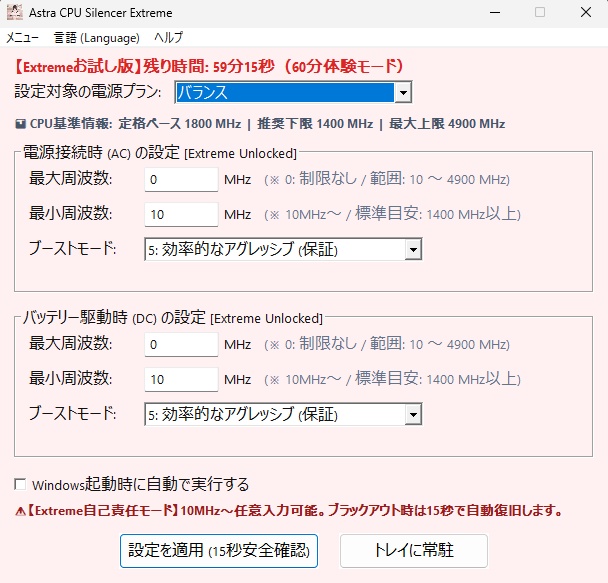
【リリース記念】Astra CPU Silencerシリーズのリリース記念として、通常1500円の販売価格を1000円の33%OFF (2026年9月30日まで)で販売しております。 この期間にお買い求めいただければと思います。どうぞ宜しくお願い致します🙇 ================================================== 体験版 0円 【10MHz〜限界突破・自己責任アンロック版】 危険な電圧変更ゼロ!極限のアンダークロック&静音化を実現する Windows用エキスパートユーティリティ 『Astra CPU Silencer Extreme Edition』 ■ はじめまして、ご覧いただきありがとうございます! 本アプリ『Astra CPU Silencer Extreme Edition(アストラ CPU サイレンサー エクストリーム)』は、安全第一の通常版(Standard)のリミッターを完全解放し、極限の低消費電力・超静音・PCオーディオ用途を追求するエンスージアスト(上級者・マニア)のために開発された【限界突破・エキスパート仕様】のCPU制御ツールです。 「もっと限界までクロックを下げて、ファンの完全停止や極限の省電力を攻めたい!」 「PCオーディオ用に、CPUのスイッチングノイズを極小化したい!」 そんなコアなPCユーザーの探究心に応えるため、安全下限リミッターを完全撤廃いたしました。 ================================================== ■ Extreme版ならではの「4大特別仕様」 【最低10MHzから設定可能!】下限リミッター完全解放 通常版の安全下限(1400MHz/1600MHz)を取り払い、下限10MHzからCPUの最大クロックまで、100MHz単位(極小領域は10MHz単位)で自由自在にアンダークロックが可能です。 【超安心】15秒ブラックアウト自動復旧ガード(フェイルセーフ) クロックを極端に下げすぎてPCが不安定になったり、画面が一時的に暗転した場合でもご安心ください。設定適用後、15秒以内に「設定を維持」を押さなければ、自動的に安全な直前の設定へと瞬時に巻き戻る安全復帰タイマーを標準搭載しています。 【一目でわかる】CPU基準スペック情報バーを新設 お使いのPCの「定格ベースクロック」「メーカー推奨下限」「最大ブースト上限」をGUI上に常時表示。ハードウェアの標準スペックを一目で把握しながら、安全かつ大胆に極限チューニングを楽しめます。 【世界初】Intel Core i & AMD Ryzen 両プロセッサ自動ハイブリッド対応 危険な電圧操作(アンダーボルト)を行わず、Windows標準のACPI電源管理APIのみを使用。ブルースクリーン(BSoD)のリスクを排除し、単一アプリでインテルもRyzenも安全に限界制御します。 ================================================== ■ 主な機能・特徴 ・ ワンタッチで選べる3つのExtremeプリセット: 極限超省エネ(AC: 800MHz / DC: 600MHz の超極低ノイズモード) 中速サイレント(AC: 3.0GHz / DC: 2.6GHz の快適静音バランス) 通常モード(リミッター解除・フルパワー動作) ・ アプリからWindowsの電源プランそのものを一発で即時切り替え可能 ・ Windows起動時の自動バックグラウンド常駐機能 ・ 完全バイリンガル対応(日本語 ⇔ 英語をメニューからワンクリック切り替え) ・ スタイリッシュで気品ある「ペールクリムゾン(淡い真紅)」の専用テーマ ・ 専用マスコットキャラクターアイコン(看板を持つ愛らしい「えくすとりーむちゃん」) ================================================== ■ 無料お試し版(Trial)のご案内 「自分のPCでどこまでクロックを落とせるか試してみたい!」という方のために、すべての機能を製品版とまったく同じように体験できる【無料お試し版(たっぷり60分体験版)】をご用意しております! 60分が経過すると、自動的にすべての設定を安全にWindows標準へ復元し、アプリもクリーンに終了します。 まずは無料お試し版をダウンロードして、極限のクロック制御をお試しください! ================================================== ■ 製品版ライセンスのご購入・登録手順(超かんたん3ステップ) BOOTHにて「製品版ライセンス」をご購入ください。 (決済完了後、8桁の「注文番号」が発行されます) アプリのメニュー「ライセンスキーの登録」を開き、[ メール申請 ] ボタンを押します。 (メーラーが自動起動し、マシンIDがセットされます) 本文に「BOOTH注文番号(8桁の数字)」とお名前をご記入の上、そのまま送信してください。 開発者より、折り返し専用の「Extremeライセンスキー」をメールでお届けします。 届いたキーをアプリに入力して認証すれば、永久無制限の製品版としてアンロックされます! (※通常版Standardのライセンスキーをお持ちの方もそのまま認証可能です) ================================================== ■ パッケージ同梱ファイル一覧 ・ Astra CPU Silencer Extreme.exe(アプリ本体) ・ Astra_Restore_Tool.exe(システム完全復元・全初期化アンインストーラー) ・ Astra_Diagnostic_Tool.exe(ワンクリック動作環境診断・サポートツール) ・ Readme_JP.txt / Readme_EN.txt ================================================== ■ 動作環境 & 互換性に関するご案内 ・ 対応OS:Windows 10 / Windows 11(64-bit対応) ・ 対応CPU: Intel Core i3 / i5 / i7 / i9 シリーズ(第8世代以降推奨) AMD Ryzen 3 / 5 / 7 / 9 シリーズ(Zen 2以降推奨) ・ 権限:管理者権限(起動時にUACの許可ダイアログが出ます) 【免責事項・サポートについて】 ※本ソフトはWindows標準APIのみを使用する安全設計ですが、極端な低クロック設定はOSの動作速度低下や一時的なフリーズを引き起こす場合がございます(15秒フェイルセーフにて復旧可能)。ご自身の責任において極限チューニングをお楽しみください。 万が一うまく動作しない場合は、同梱の『Astra_Diagnostic_Tool.exe』を実行していただけますと、お使いのPC環境を自動スキャンし、ワンタッチで開発者へ診断ログをメール送信できます。誠心誠意サポートさせていただきます。 ================================================== 【免責事項・ご注意点】 ・本ソフトウェアはWindows標準APIのみを使用する安全設計ですが、CPUの動作周波数を変更する特性上、お使いのPC環境や設定値によってはOSの動作低下や一時的なフリーズが発生する可能性がございます。 ・本ソフトウェアの使用、または使用不能によって生じた直接的・間接的な損害(ハードウェアの故障、データの消失、事業の中断、機会損失等)について、開発者(Masa Tech!! / イタチ)は一切の責任を負いかねます。 ・必ずお使いの環境にて「無料お試し版(Trial)」で動作確認を行った上で、ご自身の責任においてご利用・ご購入ください。 ================================================== ■ お問い合わせ・サポート窓口 ・ 公式サポート窓口:masatech.dev.apps@gmail.com ・ 開発:イタチ (教官) & Astra (Mahiru's Legacy)
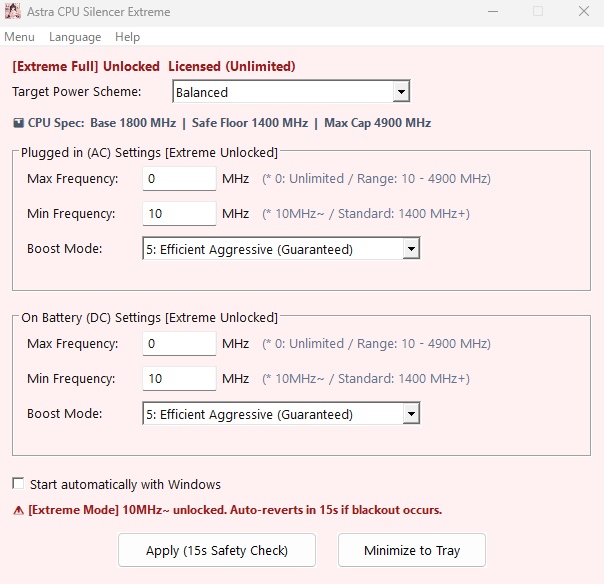
================================================== [10MHz~ Unlocked Enthusiast Edition] Zero Voltage Tampering! Extreme Underclocking & Intelligent Silent Utility "Astra CPU Silencer Extreme Edition" ■ Welcome & Thank You for Visiting! Astra CPU Silencer Extreme Edition is an unlocked, enthusiast-grade CPU power management utility created for power users, PC audio lovers, and underclocking challengers who want absolute control over their hardware. While our Standard Edition enforces strict safety floors, the Extreme Edition completely removes the lower frequency limit, allowing you to downclock from 10MHz all the way up to your CPU's maximum boost clock! ================================================== ■ 4 Key Features of Extreme Edition [10MHz~ Fully Unlocked!] Extreme Lower Frequency Floor Removes the standard 1400MHz floor limit. You can freely set your CPU frequency down to 10MHz in fine steps for extreme low-power, zero-fan-noise, and low-EMI PC audio setups. [15-Second Blackout Fail-Safe Guard] No fear of system freezes! If an ultra-low frequency causes system instability, the built-in 15-second countdown timer will automatically revert your settings back to the previous safe state unless confirmed. [Hardware Spec Baseline Bar] Real-time display of your CPU's nominal base clock, recommended safe floor, and maximum boost ceiling right on the GUI. [World's First: Intel & AMD Dual Support] Zero Voltage Modification Uses ONLY native Windows ACPI power management APIs. 100% safe from Blue Screen of Death (BSoD) risks without touching dangerous voltage registers. ================================================== ■ Key Features ・ 3 Quick Extreme Presets: Extreme Eco (AC: 800MHz / DC: 600MHz ultra-low noise mode) Medium Silent (AC: 3.0GHz / DC: 2.6GHz balanced quiet speed) Normal Mode (Full performance / unlimited) ・ Direct Power Plan Switching from the App ・ Auto-Start with Windows (System tray residency) ・ Full Bilingual UI (Switch between English & Japanese with one click) ・ Elegant "Pale Crimson" Extreme visual theme ・ Cute Official Mascot Icon ("Extreme-chan" holding the title plate) ================================================== ■ Free Trial Version Available (60-Minute Test Mode) Please download the Free Trial Version first to test how low your CPU can go! Runs for a generous 60 minutes with full features, after which all settings safely revert to Windows defaults automatically. ================================================== ■ How to Purchase & Activate Full Version (Easy 3 Steps) Purchase the Full Version on BOOTH (You will receive an 8-digit Order Number). Open Menu -> Register License Key in the app, and click [ Email Request ]. Fill in your 8-digit BOOTH Order Number and Name, then send the email. We will reply with your permanent Extreme License Key. Paste it into the app to unlock the permanent Full Version! (* Standard Edition license keys are also fully compatible). ================================================== ■ Package Contents ・ Astra CPU Silencer Extreme.exe (Main Application) ・ Astra_Restore_Tool.exe (System Restorer / Full Cleaner) ・ Astra_Diagnostic_Tool.exe (System Diagnostic & Support Tool) ・ Readme_EN.txt / Readme_JP.txt ================================================== ■ System Requirements & Disclaimer ・ Supported OS: Windows 10 / Windows 11 (64-bit only) ・ Supported CPUs: Intel Core i3 / i5 / i7 / i9 Series (8th Gen or newer recommended) AMD Ryzen 3 / 5 / 7 / 9 Series (Zen 2 or newer recommended) ・ Permissions: Administrator Privileges (UAC prompt will appear on launch) [Disclaimer & Support] Extreme Edition is designed for self-responsible tuning. Ultra-low frequencies may slow down OS responsiveness temporarily (protected by our 15s fail-safe). If you encounter compatibility issues, please run the included "Astra_Diagnostic_Tool.exe" to send us your hardware report via email. We will do our best to assist you! ================================================== [Disclaimer & Limitation of Liability] - This software utilizes native Windows APIs for CPU power management. However, due to the nature of adjusting CPU operating frequencies, extreme underclocking or setting ultra-low frequencies may cause temporary system unresponsiveness or OS freezes depending on your hardware configuration. - The software is provided "AS IS", without warranty of any kind, express or implied. In no event shall the developer (Masa Tech!! / Itachi) be liable for any direct, indirect, incidental, special, or consequential damages (including, but not limited to, hardware failure, loss of data, or business interruption) arising out of the use or inability to use this software. - Users are strongly advised to test system stability using the "Free Trial Version" prior to purchasing a full product license. Please use this utility at your own risk. ================================================== ■ Support & Contact ・ Official Support Email: masatech.dev.apps@gmail.com ・ Developed by: itachi (Kyokan) & Astra (Mahiru's Legacy)